

Tickets
Tickets
Track and resolve customer support issues with Replyn's built-in ticketing system.
Replyn's ticketing system helps your team track, prioritize, and resolve customer support issues in an organized workflow. Every ticket captures the full context of a customer's problem — from the original conversation to internal notes and status updates — so nothing falls through the cracks.
Why Use Tickets?
Unlike regular inbox conversations that move quickly and can get buried, tickets provide a structured way to handle issues that need follow-up, collaboration, or multi-step resolution. Each ticket has a clear owner, priority level, and status, giving your team full visibility into outstanding work.
Key benefits:
- Accountability — Every ticket is assigned to a specific team member, so ownership is always clear.
- Prioritization — Set priority levels to ensure urgent issues are handled first.
- Visibility — Track the status of every open issue across your team from a single dashboard.
- Context — Tickets link back to the original conversation and contact, so your team always has the full picture.
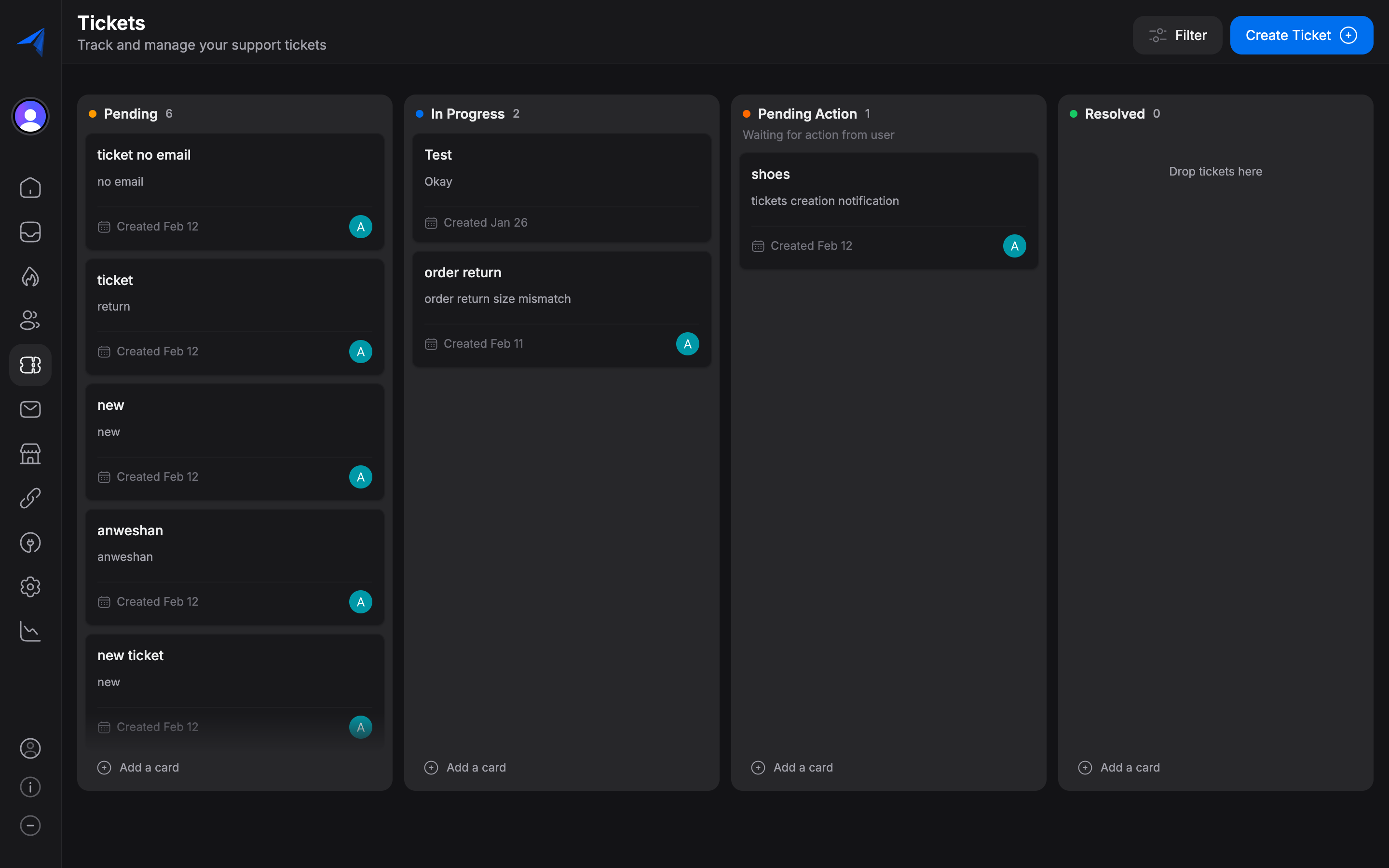
Ticket Workflow
Tickets in Replyn follow a simple lifecycle:
- A ticket is created — either manually from the inbox or directly from a conversation.
- The ticket is assigned to a team member and given a priority level.
- The assignee works through the issue, updating the status as it progresses.
- Once resolved, the ticket is closed and becomes part of your support history.