Try this: open WhatsApp Business, find a customer who messaged you three days ago, and send them "Hey, we just restocked your size 😊". Hit send.
It won't go.
Not because your internet is slow or your account is banned — but because WhatsApp simply doesn't let businesses message people whenever they feel like it. That single rule confuses thousands of shop owners every day. And the tool that gets you around it — legally, at scale, with a 98% open rate — is the part almost nobody explains properly.
It's called a message template. Here's what it really is, why Meta built it this way, and how to turn it into a quiet revenue engine for your business.
First, the thing nobody tells you on day one
WhatsApp draws a hard line down the middle of every conversation: did the customer message you first, or are you reaching out to them?
When a customer messages you, a 24-hour window opens. Inside that window you can reply with anything — plain text, photos, voice notes, emojis, links. No rules, no cost, no approval. This is the "service" conversation, and it's free.
The moment that 24-hour window closes — or when you want to start the conversation cold — WhatsApp shuts the door. You can no longer free-type. You can only send a pre-approved message template.
That's the whole reason templates exist. They're WhatsApp's way of letting businesses initiate conversations without turning the app into a spam dump like SMS became.
So what is a template, exactly?
A WhatsApp message template is a pre-written, pre-approved message format that Meta reviews before you're allowed to send it.
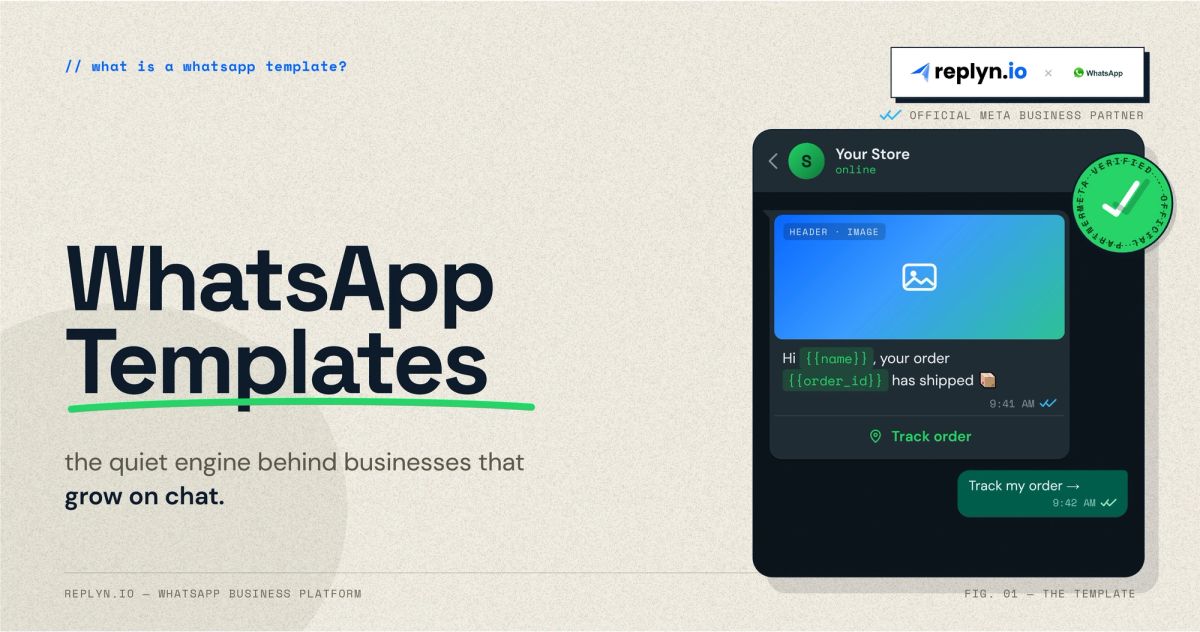
Think of it as a fill-in-the-blanks form. You write the structure once — "Hi {{1}}, your order {{2}} has shipped and arrives by {{3}}" — submit it to Meta, and once it's approved you can fire it at one customer or fifty thousand, with the blanks auto-filled per person.
A template can carry far more than text:
- Variables —
{{name}},{{order_id}},{{date}}that personalise each send - Media — a header image, video, or PDF (think a product shot or an invoice)
- Buttons — "Track order", "Pay now", "Talk to us", or quick replies
- Carousels — multiple product cards a customer can swipe through inside one message
One important catch: templates only work on the WhatsApp Business API — the engine behind platforms like Replyn — not the green WhatsApp Business app you download from the Play Store. The free app is built for a shopkeeper replying by hand. Templates are built for a business that wants to message at scale without breaking Meta's rules. That's the line between a side hustle and an operation.
The three categories — and why getting this wrong costs you money
Every template you submit has to declare a category. There are three, and Meta prices and polices each one differently.
1. Utility — transactional, triggered by something the customer actually did. Order confirmations, shipping updates, payment receipts, appointment reminders, "your subscription expires tomorrow." These are expected, welcome, and the cheapest to send. A utility message sent inside the 24-hour service window is even free.
2. Marketing — anything promotional. Offers, discounts, new-arrival announcements, "we miss you" win-backs, festival sales. This is the most powerful category for growth and also the most expensive per message.
3. Authentication — one-time passwords and login codes. Strictly formatted, no branding, no fluff. Just the code.
Here's the trap that drains budgets: if a template mixes purposes, Meta charges it as the more expensive one. Slip "...and check out our Dashain sale!" into an order-confirmation template, and what should have been a cheap (or free) utility message gets reclassified as marketing. Worse — since 2025, Meta actively scans approved templates and silently re-categorises the ones that smell promotional. You can wake up to a utility flow quietly billing you at marketing rates.
The discipline is simple: keep transactional messages clean and transactional. If you want to sell, send a separate marketing template. Don't smuggle the pitch into the receipt.
How the money actually works now
This part changed recently, so older guides will mislead you. As of July 1, 2025, WhatsApp moved from charging per 24-hour conversation to charging per delivered message. Every template that lands is billed individually, based on its category and the recipient's country.
Three levers keep your costs sane:
- Utility inside the 24-hour window is free. If a customer just messaged you, your order update costs nothing.
- Click-to-WhatsApp ads open a 72-hour free window. When someone taps your Instagram or Facebook ad and lands in WhatsApp, you get 72 hours of free messaging to close them. This is the cheapest acquisition trick most businesses ignore.
- Customer-initiated conversations are the cheap path. A QR code on your packaging, a "message us" link in your bio — anything that makes the customer hit send first — flips you into the free service window.
The strategic read: stop thinking of WhatsApp as a megaphone you pay to shout through. The businesses winning on it engineer their customers into starting the conversation, then earn the right to follow up.
Why bother at all? Because the inbox is dying and the chat list isn't
The numbers aren't close. WhatsApp messages see open rates around 95–98%, against roughly 20% for email. Click-throughs run many times higher. A message lands as a push notification in the same app where people talk to their family — not buried under twelve promo emails and a spam filter.
For a Nepali store doing cash-on-delivery, or a Dubai clinic chasing no-shows, or any business living on repeat customers, that gap is the whole game.
Five templates that quietly grow revenue
Theory is cheap. Here's where templates actually move money:
1. Order confirmation (utility). Especially powerful for cash-on-delivery markets. A "Reply YES to confirm your order" template filters out fake and impulse orders before you dispatch — cutting return-to-origin losses that silently eat COD businesses alive.
2. Abandoned-cart nudge (marketing). Someone added to cart and vanished. An hour later: "Still thinking it over, {{name}}? Your cart's saved for the next 24 hours." Recovery rates on WhatsApp routinely beat email recovery several times over.
3. Shipping & delivery updates (utility). Every "where is my order?" message a customer doesn't have to send is support time you don't pay for and trust you didn't have to earn twice.
4. Appointment & renewal reminders (utility). For clinics, salons, and subscription businesses, a reminder the day before slashes no-shows — the single most expensive gap in a booking-based business.
5. Win-back & launch broadcasts (marketing). A clean, opt-in list plus a sharp offer plus a 98% open rate is the closest thing to a guaranteed audience in modern marketing.
Where Replyn fits
Templates are powerful, but the WhatsApp Business API behind them is genuinely fiddly — getting templates approved, picking the right category so Meta doesn't reclassify and overcharge you, triggering the right message off the right event, and not losing the actual conversation in the noise.
That's the gap Replyn is built to close. As an official Meta Business Partner, Replyn lets you build and submit templates, send them at scale, and — the part that matters most — catch every reply in one unified inbox alongside your Instagram, Messenger, and TikTok conversations. A template starts the conversation; your team finishes it, in one place, without tab-juggling.
Because a template that gets opened but never answered isn't marketing. It's a missed sale with a 98% open rate.
Want to see what your first WhatsApp template flow could look like? Talk to the Replyn team →
Kshitij Subedi
Founder. Replyn